



How to set up a bonus hunt overlay in OBS
A bonus hunt overlay shows your viewers what the hunt cost, what each bonus paid and what you still need to break even. This guide sets up the free CasinoStreamTools Bonus Hunt widget in OBS and walks through a full hunt, from collecting bonuses to the final summary.
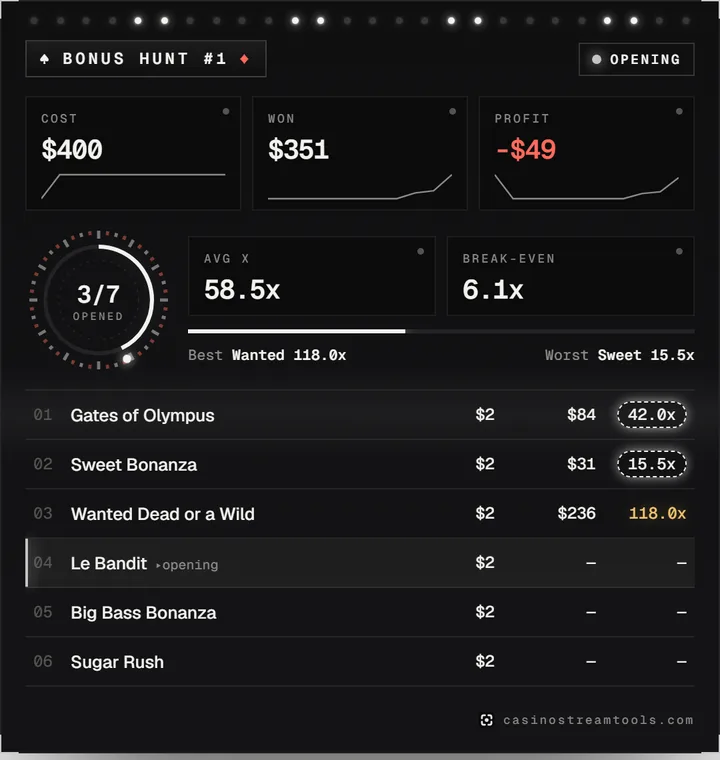
What the widget shows
- The hunt cost (your starting balance, or the sum of all bets if you leave it empty), the amount won so far and the profit or loss.
- The average multiplier of the opened bonuses and the break-even multiplier the unopened bonuses still need.
- Every bonus with its bet and, once opened, its payout and multiplier. The bonus you are opening right now is highlighted.
- A reel-spin reveal for each payout, a badge for wins from 10x, and BIG, MEGA and EPIC win effects from 100x, 250x and 500x.
- A summary card when you finish the hunt.
Step 1: create a free account and copy the OBS URL
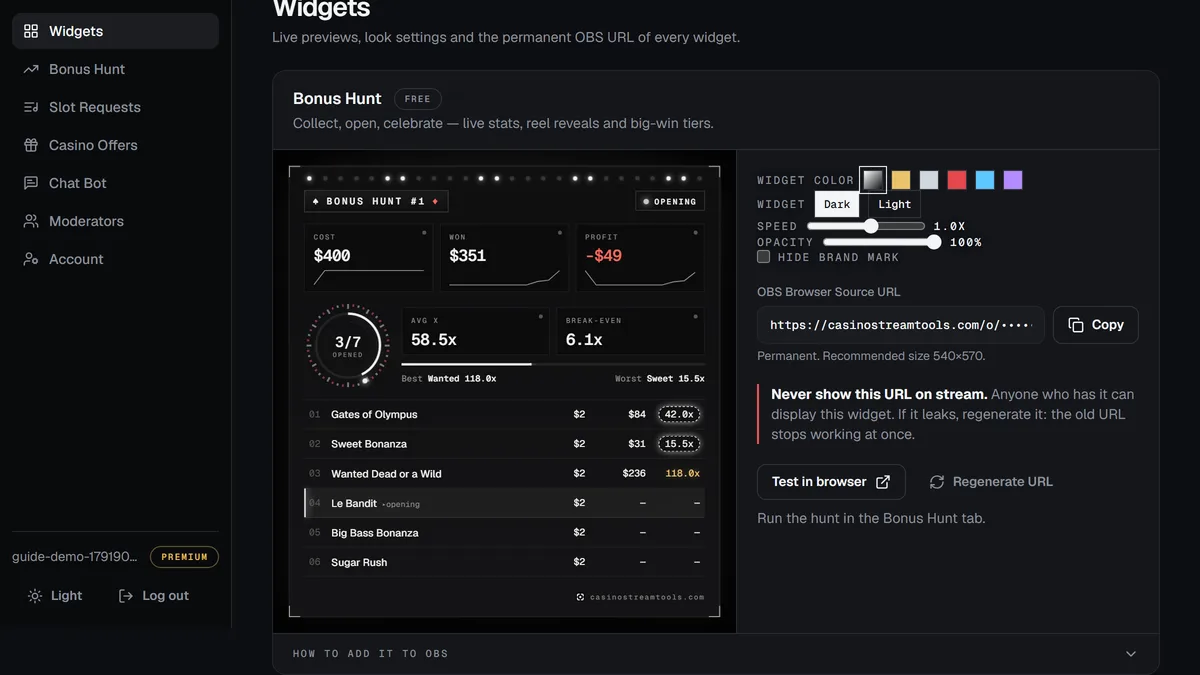
Create a free account, open the dashboard and go to the Widgets tab. The Bonus Hunt card shows a live preview and its OBS Browser Source URL. The URL is permanent: you paste it into OBS once, and every future hunt appears on it automatically.
Step 2: add it to OBS as a browser source
- In the dashboard, open the Widgets tab and press Copy next to “OBS Browser Source URL”.
- In OBS, click + under Sources, choose Browser and give the source a name.
- Paste the URL into the URL field and set Width and Height to the recommended size shown under the URL.
- Leave the background alone: the widget page is transparent, so only the widget appears over your scene.
- Click OK, then resize or move the source on your canvas like any other source.
The recommended size for the Bonus Hunt widget is 540 × 570. Larger or smaller sources work too; the widget scales to fit without stretching.
Step 3: run the hunt from the dashboard
- Open the Bonus Hunt tab and start a new hunt. Enter your starting balance if you want the cost to be your balance rather than the sum of bets.
- Collecting: add every bonus you buy or land, with the slot name and the bet. The list on stream grows as you add them.
- Opening: switch the phase to Opening. Enter each payout as you open the bonus. You can open them in any order and choose which bonus is “current”.
- Finished: switch to Finished when the last bonus is open. The widget shows the summary until you start the next hunt.
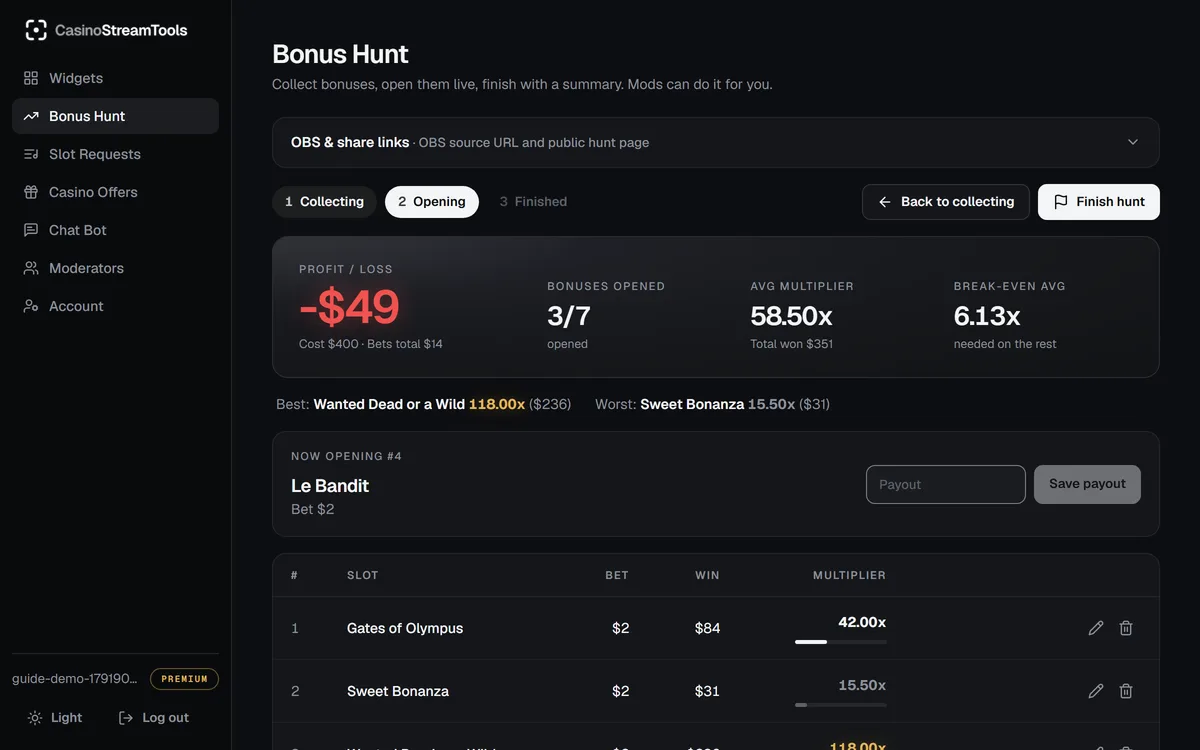
Typos are no problem: you can edit a slot name, bet or payout at any time, and clearing a payout un-opens that bonus. The dashboard and the overlay update within a few seconds.
Let a moderator run it while you play
In the Moderators tab, invite a moderator by email. Once they sign up or log in with that address, they can switch to your account in their dashboard and add bonuses, enter payouts and change phases for you. They cannot change your account settings.
Tips for a clean overlay
- Never show the OBS URL on stream. Anyone with it can display your widget. If it leaks, press Regenerate URL in the Widgets tab and paste the new URL into OBS.
- Your hunt is stored on the server, so an OBS restart, a scene switch or a reload never loses it.
- Viewers can follow the hunt on your public hunt page, linked from the Bonus Hunt tab.
- On the free plan the widget uses the default look and shows a small casinostreamtools.com line.