



Bonus hunt tracker for streamers
Most bonus hunts end up in a spreadsheet nobody trusts. The CasinoStreamTools tracker runs the hunt in your dashboard, does the maths for you and sends every change to the stream overlay instantly.
Three phases, like a real hunt
A hunt has three phases and the tracker stores them on the server. In the collecting phase you add each bonus with the slot name and the bet. In the opening phase you enter the payout of a bonus when you open it; you can open them in any order and choose which bonus is the current one. When the last bonus is open you finish the hunt and get a summary.
Mistakes are normal on stream. You can edit a slot name, a bet or a payout at any time, and clearing a payout turns a bonus back into an unopened one. The overlay follows within a few seconds.
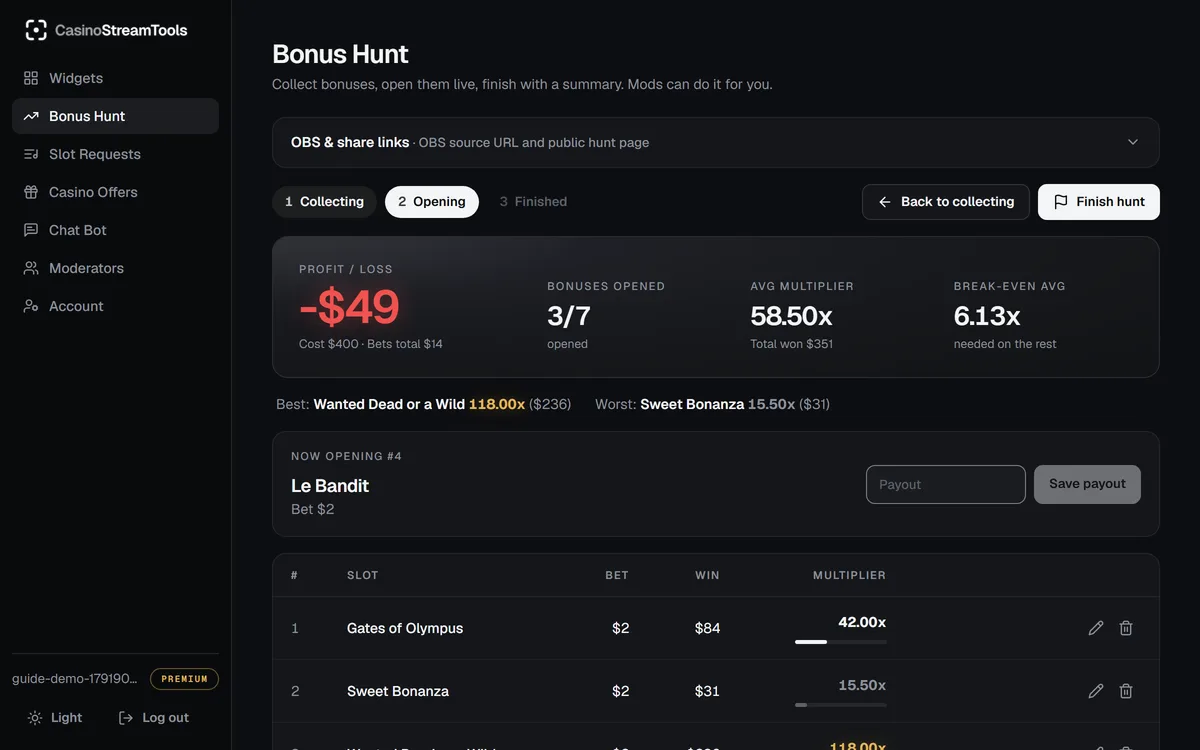
The maths, done for you
- Cost: the starting balance you entered, or the sum of all bets if you leave it empty.
- Won: the sum of all payouts so far, and profit or loss against the cost.
- Average multiplier: total won divided by the bets of the opened bonuses.
- Break-even multiplier: what the bonuses that are still closed have to pay on average to end the hunt at zero.
- Best and worst bonus by multiplier.
The same numbers are used in the dashboard, on the overlay and on the public hunt page, so what your chat sees always matches what you see.
Moderators, public page and history
Invite a moderator by email and they can add bonuses, enter payouts, switch phases and manage slot requests for your account while you play. They never see your account settings. Your viewers can follow the hunt on a public page that updates by itself, and finished hunts are kept in your hunt history (the last three on the free plan, all of them on Premium).
Show it on stream
The tracker is paired with the bonus hunt overlay, a transparent OBS browser source with one permanent URL. Setting it up takes about a minute:
- Create a free account and open the Widgets tab in the dashboard.
- Copy the permanent OBS Browser Source URL of the widget.
- In OBS press + under Sources, choose Browser and paste the URL.
- Enter the recommended width and height shown under the URL (any other size scales to fit). Leave the Custom CSS as it is.
- Press OK. The widget is transparent and updates live; the URL never changes.
Frequently asked questions
Do I need to install a program?
No. The tracker runs in your browser in the dashboard and the overlay is a browser source in OBS.
Can I open the bonuses in a different order than I collected them?
Yes. You choose which bonus is current and can open them in any order. The list and the maths follow.
How is the break-even multiplier calculated?
It is the cost minus what has been won, divided by the bets of the bonuses that are still closed.
How long is the hunt history kept?
Free accounts see their last three finished hunts. Premium, Founder and Sponsored accounts see all of them.
Can viewers follow the hunt without the overlay?
Yes. Every account has a public hunt page that shows the current hunt and updates by itself.